BECOME / Written digital course
AI for Everyday Projects.
Built by a personal trainer with 27 years of experience, for coaches, trainers and small business owners who use AI and need the result to be right.
Learn to give AI clear instructions, correct its mistakes and check the actual result.
$19 USD, one-time
Buy the course · $19Opens Stripe checkout; review the total before paying. Digital sales are final once access is delivered. Read the refund policy and exceptions.
Written by Anna Peysakh, founder of BECOME. Built while launching this website with two AI tools, checking every step.

What you get
- A 26-page PDF course with printable exercises, Maya’s complete example and a BECOME case study.
- A separate editable Word workbook for your project brief, responsibility table, handoff checklist, evidence log and workflow summary.
- Six self-paced written lessons with worked examples, reusable prompts and a launch check.
Choose one small written project, fill in the templates, use your instructions with your AI tool, then check and improve the result.
Look inside the course
Read a real lesson page and see the matching printable exercise.
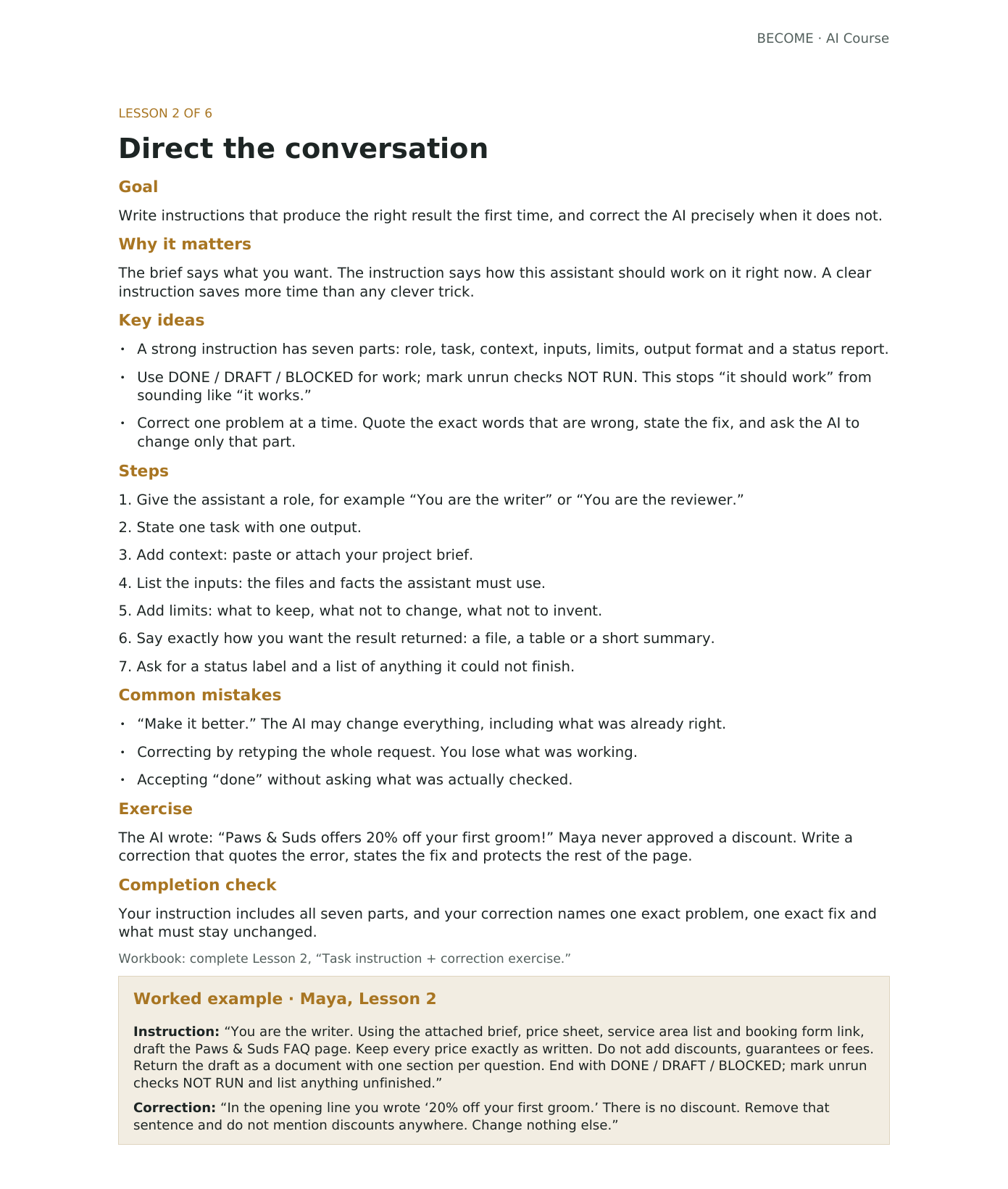
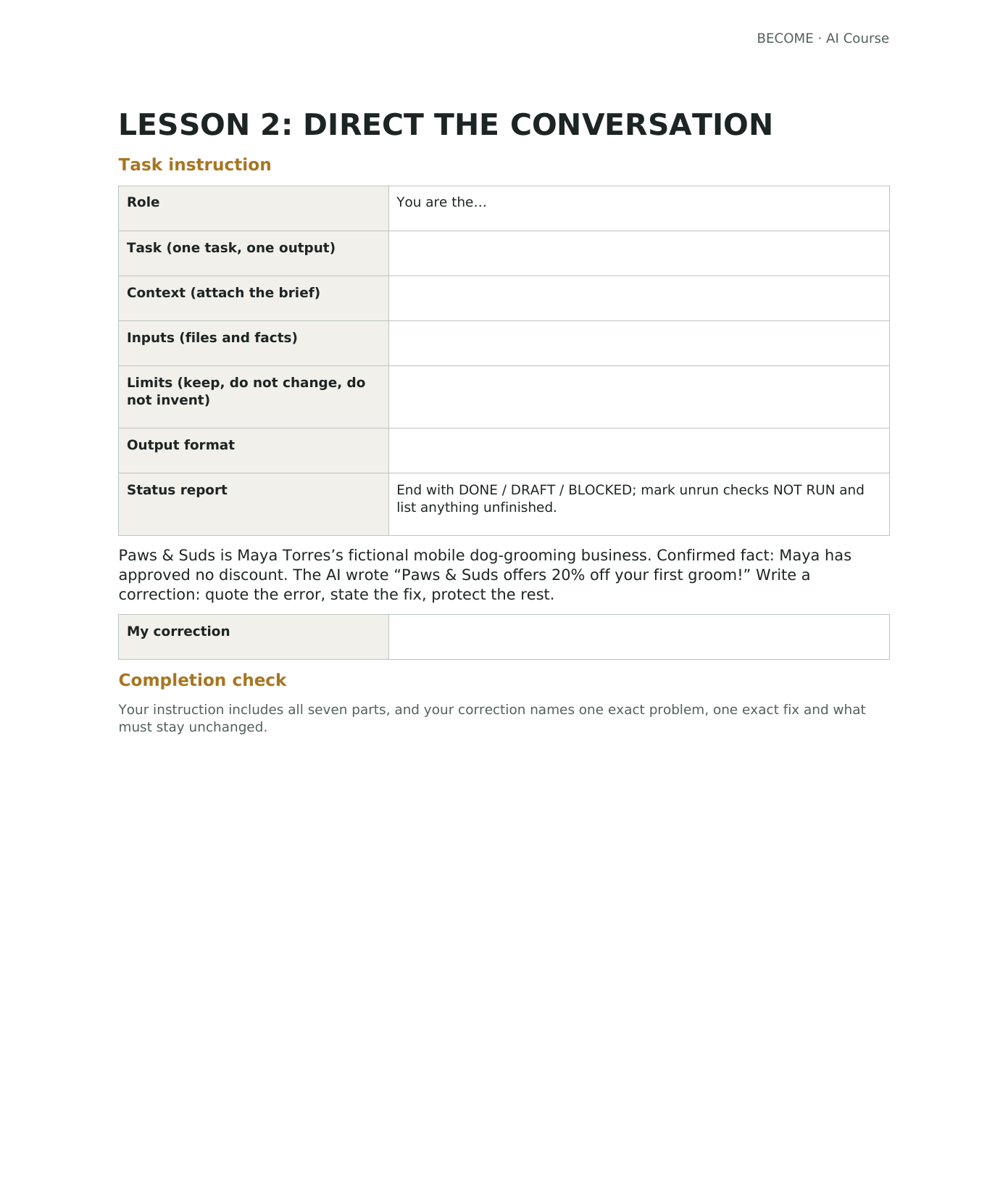
15-second course preview
This is a promotional preview. The course is a written learning pack, with no video lessons or live coaching.
Read the preview text
Tired of fixing AI’s answers? You + AI. Make it useful. Less guessing. More making. Six written lessons + Word workbook. Self-paced. Ask clearly. Check the result. Write a clear brief. Check the facts. Your idea. Your next step. AI for Everyday Projects · $19. become.vision/ai-course. Follow the journey.
The six lessons
- 01
Define useful work
Write a brief with one output, an audience, confirmed facts, and a checkable definition of done.
- 02
Direct the conversation
Give AI clear instructions and correct an exact error without rewriting everything.
- 03
Assign clear roles
Decide who builds, reviews, researches and approves the work.
- 04
Transfer files and decisions
Keep versions and handoff notes clear so the next person can continue.
- 05
Verify the result
Record what was checked, on which version, with evidence and a result.
- 06
Turn repeat work into a routine
Write the trigger, inputs, steps, reviewer and stop rules; use a manual reminder if needed.
Maya’s worked example
Maya is the fictional owner of a mobile dog-grooming business. She uses AI to draft a one-page FAQ and price list from facts she supplies, checks the prices and corrects invented discounts. Her completed templates show how to organize the files and plan a weekly social post.
A free first step
Free: Check Your AI Work
A one-page, 8-step checklist to catch AI mistakes before your customers do.
Before you buy
Does this teach me to build and launch a website?
This course teaches how to manage and check an AI-assisted project. The BECOME website appears as a case study about mistakes and verification. It does not provide a step-by-step website design, coding, hosting, domain, payment-setup or launch tutorial, and a finished website is not included.
What do I need to use the course?
You need a PDF reader, an app that can edit Word (.docx) files, and access to an AI tool for the exercises. AI accounts or paid subscriptions are separate from this purchase.
Is this video training or live coaching?
This is a self-paced PDF course and editable Word workbook. It does not include video lessons or live coaching.
What if I need help accessing my files?
Email [email protected] with your purchase email and receipt reference. Do not send card details. For duplicate charges or access problems we cannot resolve, see refunds and cancellations.
Can I request a refund?
All digital-course sales are final once access is delivered. If you’re charged twice or cannot access the files and we cannot resolve the problem, email [email protected] for a refund. This policy does not limit rights required by law. See refund details.
No income or perfect AI result is guaranteed. You still need to check AI output, and business results depend on your offer, work, and customers.